
What Is Minecraft Adventure Mode?
Minecraft Adventure Mode offers many ways to play, but Adventure Mode feels unique from the start. It gives players a guided path through custom maps filled with objectives, puzzles, NPCs, and scripted events. Each area, item, and challenge has a purpose.
Many players explore Adventure Mode for story-driven gameplay rather than free building. They want quests, hidden secrets, and structured exploration. Younger players enjoy the clear direction, while parents value controlled interactions. Map creators use this mode to design worlds without risk of players breaking key blocks.
This guide helps all types of players. Beginners learn mechanics and avoid common mistakes. Regular players discover new maps, downloads, and commands. Parents understand why the mode feels different from standard Minecraft. Creators get a full view of tools like command blocks, NPCs, redstone triggers, and resource packs.
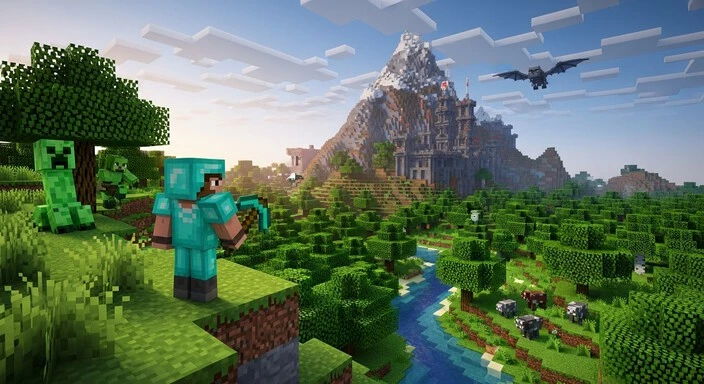
Minecraft Adventure Mode is designed for structured gameplay. Players explore maps, complete quests, solve puzzles, and trigger events. Every element is carefully designed to create challenges and stories.
Unlike Survival, players cannot break or place blocks freely. Tools must have special tags for interaction. This prevents accidental map damage and ensures puzzles and challenges work properly. Map creators rely on these rules to control progression.
Creative Mode is different. It gives unlimited building, destroying, and testing. Adventure Mode keeps players focused on objectives rather than building. This makes it ideal for custom maps, RPG experiences, and story-driven worlds.
Minecraft Adventure Mode works on both Java and Bedrock editions. Commands and tools function similarly, letting creators share maps across platforms. Its main purpose is to provide a structured path, combining exploration, combat, puzzles, and rewards in a controlled environment.
Key Features of Adventure Mode
Custom Maps: Players explore worlds made by others, filled with puzzles, quests, and stories. Each map delivers unique challenges and experiences.
Command Blocks: Hidden blocks trigger events, rewards, or dialogue. They allow creators to automate challenges and control map flow.
NPC Interactions: Non-player characters give quests, hints, or branching choices. They make maps feel alive and guide player progression.
Redstone Mechanisms: Circuits create doors, traps, timers, and hidden paths. They add interactive puzzles and challenges for players to solve.
Map-Specific Objectives: Goals like collecting items or defeating mobs focus player effort. They provide purpose and structure.
Loot Systems: Chests, drops, and rewards are placed intentionally. They reward exploration and encourage completing challenges.
Mob Encounters: Combat appears in designated zones. These encounters test skill while keeping progression controlled.
Scripted Events: Actions like doors opening, enemies spawning, or cutscenes starting happen automatically. They maintain story pacing and engagement.
Locked Areas: Sections remain blocked until tasks are complete. This prevents skipping challenges and preserves map design.
Resource Packs: Custom textures, sounds, and UI elements enhance the story or theme. They create immersion and reinforce the map’s atmosphere.
These features give creators control and provide players a rich, story-driven experience.
Adventure Mode Rules & Restrictions
Minecraft Adventure Mode limits how players interact with the world. Players cannot break blocks unless their tools are tagged to allow it. They cannot place blocks freely. These limits protect map design and prevent accidental damage.
Creators control which blocks can be broken or placed. This ensures puzzles work and hidden areas remain locked until players meet objectives. Redstone mechanisms and scripted events function reliably because players cannot interfere with key blocks.
Restrictions guide gameplay. Players focus on exploration, quests, and challenges instead of building or destroying randomly. Maps retain their structure, and progression stays predictable. Younger players enjoy a safer environment, and parents can understand why it feels different from regular Minecraft.
By enforcing these rules, map creators maintain challenge, narrative flow, and puzzle integrity. Players get a structured experience that feels intentional.
How to Enable Adventure Mode
For Java Edition
Use the command:
/gamemode adventure
or select Adventure Mode in world settings. You can change modes mid-game with the same command. On servers, operator permissions may be required to switch modes.
For Bedrock Edition
Enable Adventure Mode in world settings or via the same /gamemode adventure command. Switching is simple, though some map-building features differ from Java. Creators should test maps on both editions to ensure commands and redstone devices work correctly.
How to Play Minecraft Adventure Mode (Beginner-Friendly)
Minecraft Adventure Mode focuses on exploration and objectives. Players interact with signs, NPCs, and objects to gather information and follow quests. Read messages carefully; they often contain hints for progression.
Collect items as you find them. Track them in your inventory. Chests may hold keys, tools, or clues necessary to complete objectives. Observe environmental cues like unusual block patterns, hidden doors, or redstone mechanisms.
NPC dialogue often guides the next step. Skipping hints can make puzzles harder. Explore each area thoroughly before moving forward. Players cannot break most blocks, so progression relies on exploration, problem-solving, and interaction.
Advanced Adventure Mode Gameplay Tips
Combat can be tricky, especially in tight spaces. Stay alert, use the right tools, and plan attacks. Avoid rushing into enemies.
Timing and pattern-based puzzles require observation. Watch moving blocks, trap sequences, and redstone signals. Remember sequences to solve puzzles efficiently. Patience is key.
Redstone-based mechanisms often control doors, traps, or rewards. Test triggers slowly and look for patterns. Understanding circuits helps players progress without frustration.
Traps appear anywhere. Move cautiously and watch for pressure plates, tripwires, or suspicious blocks.
In multiplayer, teamwork matters. Stick together in dangerous areas. Divide puzzle responsibilities and coordinate combat. Track quests actively and check your inventory to avoid missing objectives.
Popular Types of Adventure Maps
| Map Type | Features | Best For |
| Story Maps | Characters, dialogue, plot progression | Players who enjoy role-playing and narratives |
| Puzzle Maps | Logic, redstone, pattern-based challenges | Players who enjoy problem-solving |
| Parkour Maps | Jumping challenges and obstacle courses | Players who enjoy platforming and timing |
| RPG Adventure Maps | Towns, dungeons, gear progression, bosses | Players who enjoy role-playing and progression |
| Survival Adventure Worlds | Resource management with guided objectives | Players who enjoy a mix of survival and structured challenges |
Best Minecraft Adventure Maps
Minecraft Adventure Mode maps cater to all skill levels. Categorizing maps helps players find suitable experiences.
Beginner-Friendly Maps: Teach Adventure Minecraft creative Mode mechanics and offer smooth challenges.
Co-op Maps: Encourage teamwork. Players solve puzzles and handle combat together.
Story-Heavy Maps: Focus on narrative and role-playing. Players enjoy quests and character interaction.
Puzzle Maps: Emphasize logic, redstone, and pattern recognition. Minimal combat keeps the focus on brain challenges.
Platform-Specific Maps: Some maps target Java or Bedrock editions. Choosing the correct version ensures smooth gameplay and functionality.
Downloads & Resources
Players find Minecraft Adventure Mode on trusted sites and marketplaces. Map downloads often include only the adventure area. Full world downloads contain entire worlds with player data. Knowing the difference prevents overwriting progress.
Java Edition: Extract the .zip map into the saves folder. Open Minecraft and select the map.
Bedrock Edition: Open the .mcworld file. Minecraft imports it automatically.
Always avoid suspicious sites, check reviews, and scan files. This keeps gameplay safe and smooth.
Adventure Mode Commands
Switch Modes:
/gamemode adventure
Switches a player into Adventure Mode.
Give Items:
/give <player> <item> <quantity>
Provides tools or items for testing or puzzles.
Activate Command Blocks:
/setblock <x> <y> <z> command_block
Places command blocks for events or rewards.
Set Conditions:
/execute if <condition> run <command>
Triggers actions only under specific conditions.
Control Player Interactions:
/scoreboard objectives add <name> dummy
/scoreboard players set <player> <name> <value>
Tracks progress and enforces tasks.
How to Create Your Own Adventure Map
Plan Objectives, Layout, and Story: Decide goals, quest flow, and map layout.
Build Environments: Construct areas and landmarks. Use blocks, terrain, and structures to guide players.
Use Command Blocks: Automate events, unlock doors, or spawn mobs.
Add NPCs and Dialogue: Provide quests, hints, and story guidance.
Design Puzzles and Combat Areas: Include logic puzzles, traps, and combat zones.
Create Locked Regions: Restrict areas until players complete objectives.
Test Progression: Play through the map and fix broken mechanics.
Add Resource Packs: Enhance immersion with textures, sounds, and UI elements.
Package the Map: Compress the folder or create a .mcworld file for sharing.
Thorough testing ensures players experience puzzles, story, and challenges as intended.
Best Mods for Adventure Mode
Mods can add mechanics, story elements, and custom items. Java Edition supports dialogue editors, quest systems, environment enhancers, and combat add-ons. Bedrock Edition has limited add-ons for items, mobs, and scripts.
- Dialogue Editors: Create branching conversations.
- Quest Systems: Track objectives and rewards.
- Environment Enhancers: Add custom textures or interactive elements.
- Combat Add-Ons: Introduce new mobs and boss mechanics.
Use mods carefully and check version compatibility to avoid conflicts.
Adventure Mode Servers
Servers host Minecraft Adventure Mode worlds or campaigns. Players explore, solve puzzles, and complete quests together.
Good servers have stable performance, clear rules, and active moderation. Well-designed maps and command setups ensure smooth gameplay.
Join by adding the server address in multiplayer. Co-op play emphasizes teamwork: divide puzzles, coordinate combat, and share tasks.
Adventure Mode vs Other Game Modes
Survival vs Adventure: Survival is open-ended. Players gather resources and build freely. Adventure Mode follows guided objectives with controlled interaction.
Creative vs Adventure: Creative allows unlimited building and flight. Adventure Mode limits tools to maintain challenge. Creators often build in Creative, then test in Adventure Mode.
Understanding these differences helps players choose the mode that fits their goals.
Troubleshooting & Common Questions
Cannot Break Blocks: Use only tagged tools. Check map instructions.
Command Blocks Not Activating: Ensure command blocks are enabled and redstone triggers work.
Missing Textures: Verify resource pack matches your version and reinstall it.
Map Not Loading: Place files in correct folders and check game version.
Restarting Minecraft and using trusted download sources fixes most issues.
Frequently Asked Questions (FAQs)
Conclusion
Adventure Mode offers structured, story-driven gameplay. Players enjoy quests, puzzles, and combat challenges. Creators can build complex worlds with command blocks, NPCs, and redstone mechanisms.
It suits beginners, regular players, and map makers. With diverse maps, servers, and mods, Adventure Mode keeps Minecraft fresh.
Try different maps to explore new stories and challenges. If you enjoy building, create your own map. Adventure Mode shows that Minecraft can be more than survival or creative play—it can be a full interactive adventure.
Minecraft Adventure Mode offers a structured, story-driven gameplay experience that goes beyond traditional Survival or Creative modes. In Adventure Mode, players can explore custom maps, complete quests, solve puzzles, and engage in challenging combat, making each session unique and exciting. This mode encourages exploration and creativity while introducing strategic gameplay elements that test problem-solving skills.
Creators and map makers can build complex interactive worlds using tools like command blocks, NPCs, custom mobs, and redstone mechanisms. Adventure Mode allows designers to control how players interact with the environment, create intricate traps, scripted events, and engaging challenges. Whether you are designing a dungeon crawl, a treasure hunt, or a role-playing quest, this mode gives full creative control with structured gameplay rules.
Adventure Mode is suitable for beginners, regular players, and experienced map creators alike. Its flexibility supports a wide variety of maps, from survival-based adventures to cinematic roleplay experiences. Many servers and community maps also include mods and add-ons that expand gameplay mechanics, introduce new mobs, or enhance storytelling, keeping Minecraft fresh and replayable.
Players are encouraged to try different maps to explore new stories, challenges, and creative setups. For those who enjoy building, creating your own Adventure Mode map is a rewarding way to combine storytelling with gameplay design, whether for friends, server communities, or global sharing. Adventure Mode demonstrates that Minecraft can go far beyond survival crafting or free-form building—it can be a full interactive adventure, blending creativity, strategy, and storytelling.
By experimenting with maps, mods, and custom mechanics, players develop problem-solving skills, collaborative gameplay experience, and design expertise. Adventure Mode turns every Minecraft session into a dynamic journey, encouraging creativity, exploration, and engagement across both Java and Bedrock editions.